The first screen you see every day — a quick summary of income, expenses, attendance, and anything that needs your attention.
وَقُلِ اعْمَلُوا فَسَيَرَى اللَّهُ عَمَلَكُمْ وَرَسُولُهُ وَالْمُؤْمِنُونَ
“And say, ‘Do [as you will], for Allah will see your deeds, and [so, will] His Messenger and the believers.’”
— Surah At-Tawbah, 9:105
The Dashboard is what opens first when a Mohtamim or Nazim logs in. Instead of digging through separate pages, it pulls this month's most important numbers into one screen — so a problem (like unusually low attendance, or fees falling behind) is visible immediately, not discovered days later.
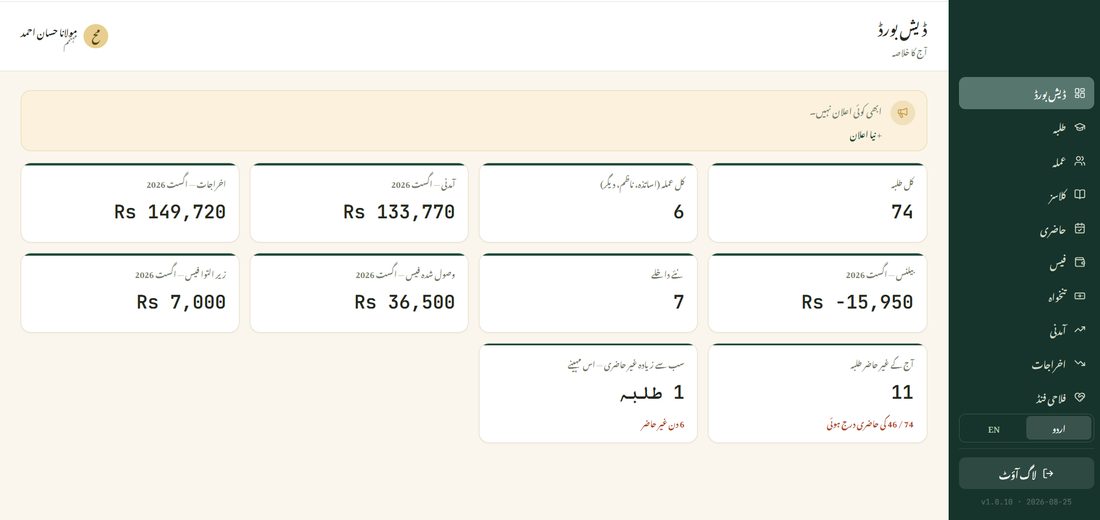
Each card on the Dashboard covers this current month, and tapping most of them takes you straight to that module for more detail:
Tap the Today's Absent Students card to see the breakdown behind that one number — every class listed, with either its absent count or a note that attendance hasn't been marked yet, so you know exactly which class to follow up with rather than just that something, somewhere, needs attention.
The banner at the top of the Dashboard is also where announcements go out to staff and parents.