Every source of income your madrasa receives, categorized clearly — so it's always obvious where the month's money actually came from.
كُلُوا مِن طَيِّبَاتِ مَا رَزَقْنَاكُمْ وَاشْكُرُوا لِلَّهِ
“Eat of the good things which We have provided for you, and be grateful to Allah.”
— Surah Al-Baqarah, 2:172
The Income page shows this month's total, broken down by category — Zakat, Fitrana, Sadaqah, Donations, Admission Fees, Student Fees (pulled in automatically from the Fees page), and Other Income.
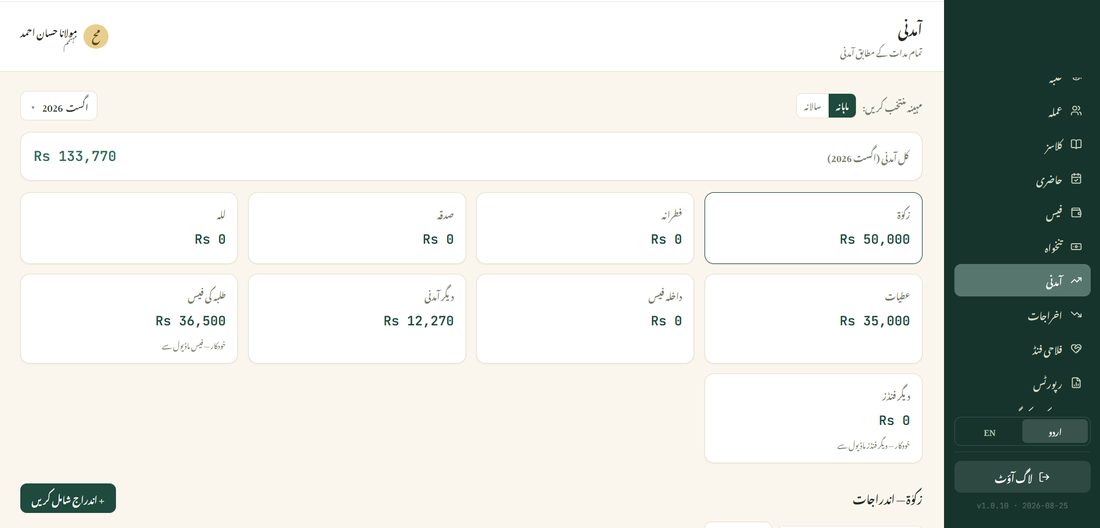
Student Fees and Admission Fees fill in automatically from their own pages — you never enter those here manually. Everything else (Zakat, Fitrana, Sadaqah, Donations, Other Income) is entered directly on this page.