Charity money — Zakat, Fitrana, Sadaqah, and Donations — tracked completely separately from your regular accounts, by fund.
وَأَقِيمُوا الصَّلَاةَ وَآتُوا الزَّكَاةَ
“And establish prayer and give zakah.”
— Surah Al-Baqarah, 2:110
The Welfare Fund keeps charity money completely separate from your madrasa's regular income and expenses — this is money collected specifically to help people, not to run the madrasa, and it deserves its own, cleaner record.
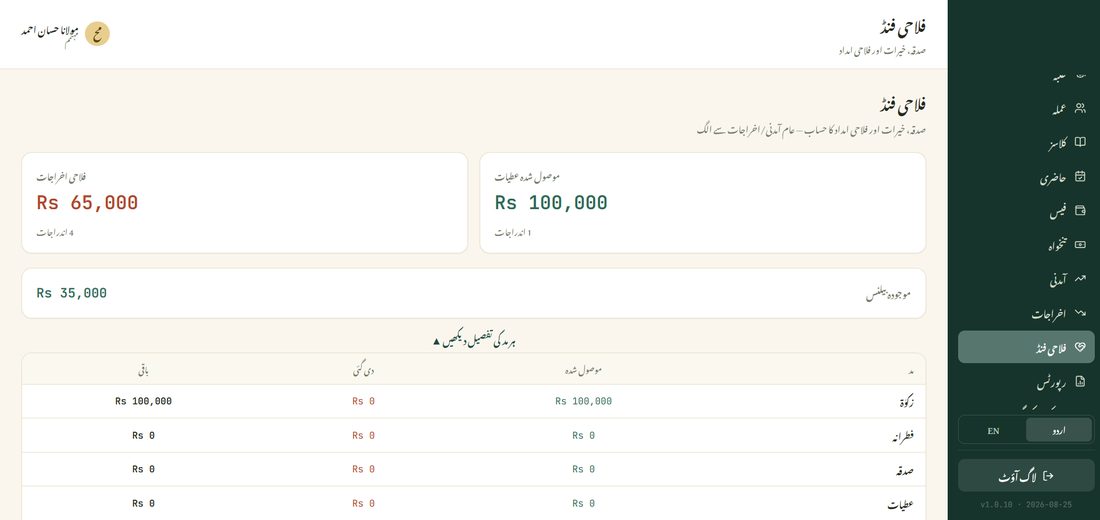
When money is actually given to someone, open the Welfare Expenses card and record two things: which fund it was drawn from (Zakat, Fitrana, Sadaqah, or Donations), and what it was for (Medical Aid, Education Support, Food Assistance, Marriage Assistance, Widow/Orphan Support, or Other). Recording the fund it came from is what lets the app tell you what's left of each one specifically.
Tap View Breakdown By Fund (ہر مد کی تفصیل دیکھیں) to see, for each fund separately: how much was collected, how much has been given out, and what's actually left — the direct answer to “how much Zakat money do we still have?”