Every summary your madrasa needs — financial, attendance, fees, salary — ready to print or share in a few taps.
اقْرَأْ كِتَابَكَ كَفَىٰ بِنَفْسِكَ الْيَوْمَ عَلَيْكَ حَسِيبًا
“Read your record. Sufficient is yourself against you this Day as accountant.”
— Surah Al-Isra, 17:14
Reports pulls together everything else in the app into ready-to-share summaries — no need to manually calculate totals from other pages.
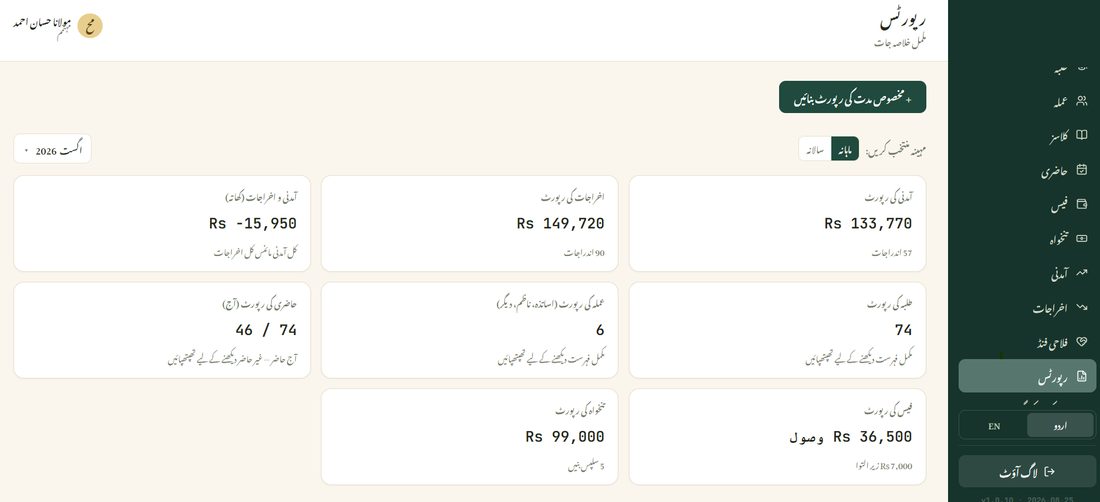
Switch between Monthly and Yearly at the top, and each card below updates instantly — Income, Expenses, Attendance, Staff, Students, Salary, and Fees, each with a link through to the full detail behind that number.
For Income or Expenses specifically, the generated report is a formal, letterhead-style document — your madrasa's name and contact details, the period, a category-by-category breakdown, and space at the bottom for a signature and stamp. It's built to be printed and put up on the notice board, not just viewed on a screen.