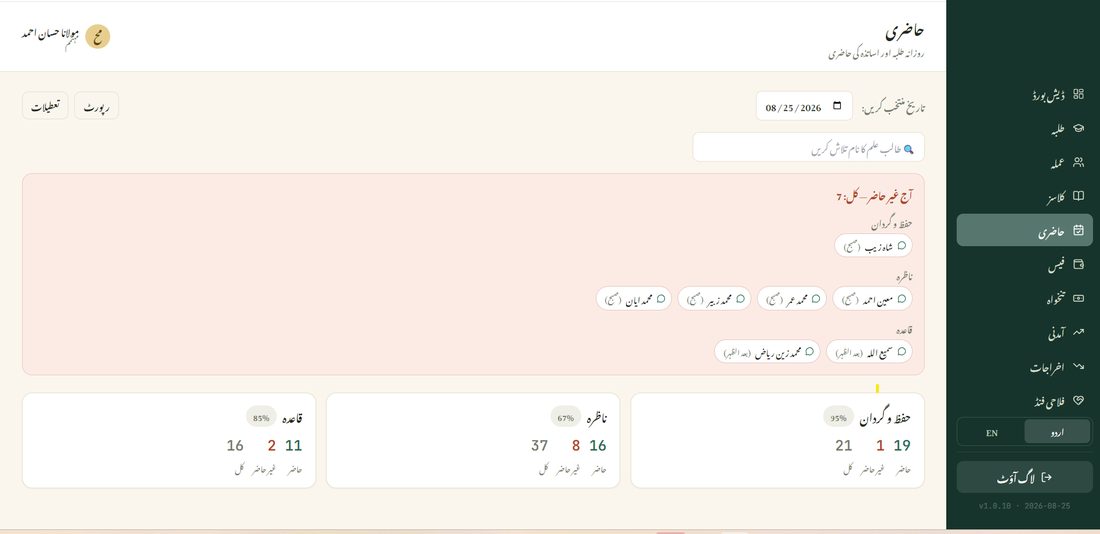
📋 Overview
The Attendance page is where you mark, every day, who came to the madrasa and who didn't — for students in every class, and for teachers too. It automatically knows your madrasa's weekly holiday and any declared holidays, so you're never asked to mark attendance on a day nobody was expected to be there.
🕓 Time Slots
A class isn't limited to one attendance a day — set up as many time-slots as it actually runs (Morning and Evening, for example, or Morning/Afternoon/Evening for a full-day school-style class), each with its own start and end time. Attendance, absent counts, and percentages are all tracked separately per slot, not blended into one daily number.
Time-slots are set up from the Classes page, not here — see the Classes guide for how to add and order them.
Not every student needs to attend every slot — a student can be restricted to only the slot(s) that actually apply to them, from their own profile, so they're never wrongly counted absent from a session they were never expected at.
✅ Marking Today's Attendance
From the sidebar, open Attendance (حاضری). It opens on today's date by default.
- Pick a class time-slot — each one shows its own list of students.
- Tap a student's name to mark them Absent or on Leave — everyone starts the day marked Present, so you only need to touch the names that weren't there.
- Add a short note next to a name if needed (a comment icon sits right beside each one) — useful for recording why someone was absent.
- Teachers' own attendance is marked the same way, from the same page.
No extra step to save. Every tap is recorded right away — there's no separate "Submit" button to remember.
🗓️ Holidays
Tap the Holidays (تعطیلات) button at the top of the page to manage two kinds of days off:
- Weekly holiday — set once (e.g. every Friday), and it applies automatically, every week, forever.
- Declared holidays — for specific dates (Eid, a public holiday, anything one-off), add the date range once and it's remembered.
On a holiday, the Attendance page shows that clearly instead of asking you to mark anyone — nothing to do on those days. A weekly holiday can even be set to start or end partway through the day (e.g. after the Evening slot on Saturday through before the Evening slot on Sunday), so a class with multiple slots only shows the holiday note for the slot(s) actually affected — the rest still mark normally.
🕒 Checking a Previous Day
Use the date field at the top-right to jump to any past date — the same screen shows exactly who was marked present, absent, or on leave that day.
At the bottom of the page, each class shows its own attendance percentage for the selected day, along with the present/absent/total count — a quick way to spot a class with unusually low attendance.
🖨️ Generating a Report
- Tap Report (رپورٹ) at the top of the page.
- Choose Weekly, Monthly, or Yearly, and whether it's for a whole class or one specific student.
- Present, absent, on-leave, and attendance percentage for that period appear right on screen, slot by slot.
For a printable, shareable document, the Reports module (see its own guide page) covers Attendance too, alongside Income, Expenses, Fees, and Salary.
💡 Good To Know
Only Mohtamim, Nazim, and the class's own assigned teacher can mark attendance for that class — this keeps the record reliable.
Parents and students can see their own attendance directly from their own login — you don't need to tell them separately.